Stays can set a minimum number of nights that apply to all bookings of each particular Stay.
The Minimum Nights setting prevents bookings being taken for anything less than the minimum number of nights.
Often this is useful for meeting local tourism and hospitality regulations concerning short term rentals.
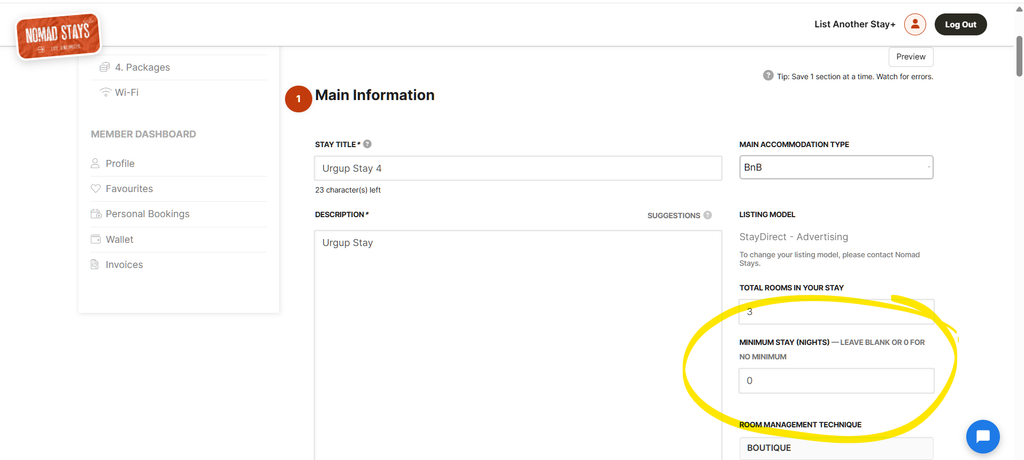
Enter on Stay Details page
Choose the “1. Details” page and enter the number of nights, in numbers, into the Minimum Stay Nights field.
Effect
Package options that are less than the minimum nights are removed from view. Booking dates are automatically updated to ensure the minimum number of nights are booked. Users are still able to add further nights as required.
Prices are increased for the additional nights based on the defacto ‘per night’ price derived from your Monthly Price. A $1,000 a month booking for a February period is the equivalent of $35.71. Extra nights added will have additional rates of $35.71 added.
Examples:
A 1 month booking commencing on 1 February will automatically have 30 nights applied and finish on 2 or 3 March (depending on the year). Prices are increased for the extra nights.
A 1 month booking commencing on 1 March will automatically finish on 1 April when a 30 night minimum nights setting exists. Prices are not increased as no extra nights are added.