You can close your Stay Account with Nomad Stays at any stage.
Closing your Stay Account closes your whole account, not just one property. If you only want to take a single Stay off the market, you don’t need to close your account. You can pause or close just that Stay and keep your account and any other Stays as they are.
The Steps to follow are:
- Log in to your Stay Account
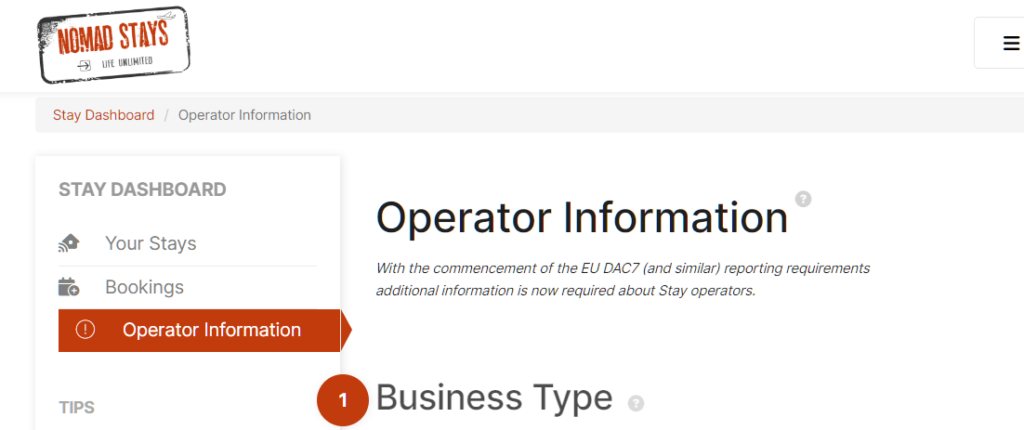
- Choose Operator Information
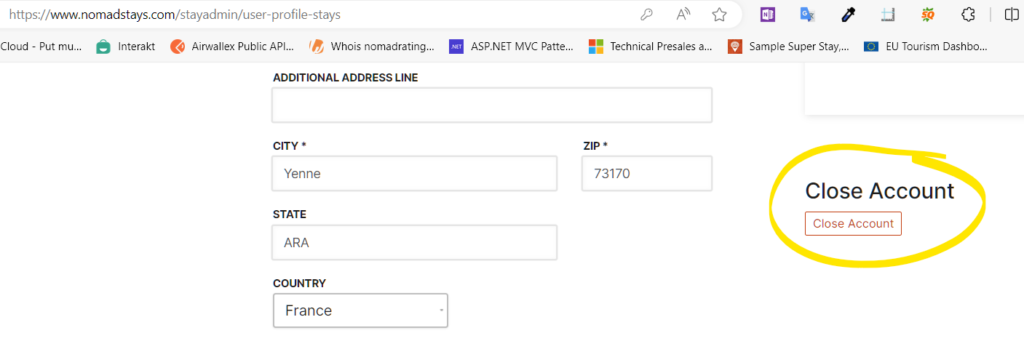
- Choose “Close Account”
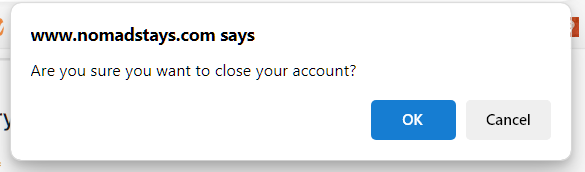
- Confirm your Account Closure
If you wish to re-list in the future, you’ll need to re-apply and re-input your information.
An Alternative: Pause or Close Just One Stay
If you don’t wish to close your account, you can pause or close an individual Stay instead.
- Pause hides your Stay from search and stops new bookings, but keeps everything as it is so you can resume at any time. Re-listing fees may apply when you resume.
- Close takes the Stay off Nomad Stays for good. Guests who have already booked are still honoured until your last guest checks out.
Both options are on the Pause or Close page for each Stay. See Pausing or Closing a Stay for the full details, and Re-Listing Fees for the fees that may apply.
If you’d like to leave a note about your plans so we can follow up in the future, please drop us a line.
How to Close Your Account
1. Log into Your Stay Account
2. Choosing Operator Information
3. Choose to Close Your Account
4. Confirming Account Closure
- Cancel Account
- Close Account
- Delete Listing